Paramètres de vidéosurveillance pour réduire les fausses alertes de mouvement dans les maisons et les petites entreprises
Une surveillance vidéo efficace dépend autant du logiciel et de la configuration que du matériel de la caméra. Les propriétaires et les petits commerçants qui reçoivent régulièrement des alertes de mouvement bruyantes ou de fausses alertes fréquentes ont besoin d’une approche systématique au niveau de l’appareil pour réduire les notifications indésirables tout en respectant les limites légales et opérationnelles. Cet article explique les réglages pratiques, les compromis et la logique décisionnelle pour réduire les alertes de mouvement indésirables sans créer de zones d’ombre en matière de sécurité. Lisez le guide complet sur la surveillance vidéo
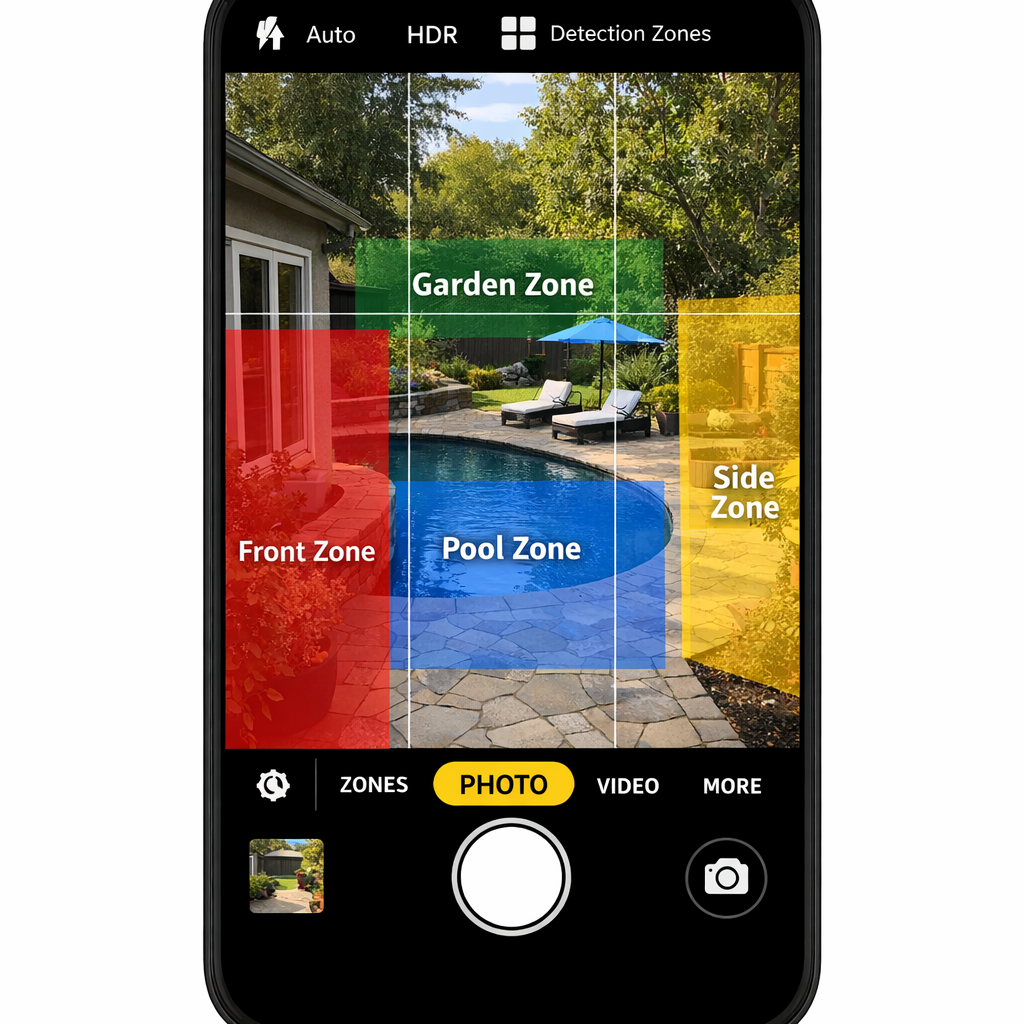
Surveillance vidéo : réglages pratiques pour réduire les alertes de mouvement indésirables
Commencez par trois contrôles de base présents sur la plupart des caméras modernes : la sensibilité, les zones de détection et la classification des objets. La sensibilité définit le seuil à partir duquel la caméra interprète un mouvement. Les zones de détection permettent d’exclure les zones où le mouvement récurrent est normal (rues, alignements d’arbres, trottoirs). La classification des objets — souvent étiquetée comme personne, véhicule, animal ou colis — filtre les alertes selon le type d’objet détecté. Ajustez ces contrôles par petites étapes et vérifiez l’impact sur plusieurs jours avant d’effectuer d’autres modifications.
Réglage de la sensibilité
Une sensibilité plus faible réduit les déclenchements dus aux petites ombres, aux insectes sur l’objectif ou au trafic lointain, mais risque aussi de manquer des événements subtils. Un processus recommandé : réduisez la sensibilité de 10 à 20 % et observez les changements pendant 48 à 72 heures. Si des événements légitimes sont manqués, remontez un peu. Pour les caméras intérieures avec un éclairage contrôlé, vous pouvez vous permettre une sensibilité plus basse que pour les caméras extérieures exposées.
Conception et utilisation des zones de détection
Les zones de détection sont un moyen puissant d’éliminer les déclenchements répétés dus aux trottoirs, aux branches d’arbres ou au trafic des parkings. Dessinez des zones conservatrices ciblant les approches critiques des portes, fenêtres ou vitrines. Évitez de placer des zones nécessitant une détection à longue portée sur des voies publiques très fréquentées, sauf si vous acceptez un volume d’alertes plus élevé. N’oubliez pas que l’exclusion des trottoirs publics peut avoir des implications légales et probatoires dans certaines juridictions ; conservez un enregistrement clair des raisons pour lesquelles les zones ont été définies ainsi.
Classification des objets et règles combinées
La classification des objets est de plus en plus fiable : configurez les alertes uniquement pour les catégories pertinentes à votre profil de risque (par exemple, personne et véhicule pour la sécurité périmétrique). Combinez les classifications avec des règles basées sur le temps : notifiez uniquement pour les véhicules entre 22 h et 6 h, ou pour les personnes en dehors des heures d’ouverture. Ces règles composites réduisent les alertes de mouvement indésirables tout en préservant la couverture quand elle est la plus importante.
Comparaison des méthodes de détection en surveillance vidéo et compromis
Comparez la détection de mouvement basique, la détection assistée par PIR et la détection d’objets basée sur l’IA pour comprendre les compromis.
- Détection de mouvement par changement de pixels basique est largement disponible et peu coûteuse, mais génère de nombreuses fausses alertes dues à l’éclairage ou aux mouvements environnementaux.
- Détection assistée par PIR combine la détection physique de chaleur avec la vidéo ; elle réduit les fausses alertes provenant de sources non chauffantes mais présente des contraintes de portée et de montage.
- Détection d’objets basée sur l’IA offre la meilleure précision en classifiant les objets, mais les performances varient selon le modèle et peuvent être affectées par l’occlusion, la faible luminosité ou l’angle de la caméra.
Choisissez en fonction de l’environnement : les périmètres poreux bordés d’arbres bénéficient le plus de la classification IA et des zones de détection, tandis que les intérieurs commerciaux fermés peuvent s’appuyer sur une détection par changement de pixels à sensibilité réduite combinée au PIR pour les zones réservées au personnel. Pour les parkings de centres commerciaux, vous pouvez accepter plus d’alertes véhicules et privilégier les systèmes avec une bonne classification des véhicules et des options de capture de plaques d’immatriculation. Solutions discrètes
Scénarios réels et logique décisionnelle
La prise de décision basée sur des scénarios aide à opérationnaliser les réglages. Voici des scénarios courants et les réglages recommandés adaptés aux propriétaires et petites entreprises.
Entrée résidentielle avec lumière de porche
Problème : Les ombres nocturnes et les papillons de nuit déclenchent des alertes fréquentes. Solution : Créez une petite zone de détection centrée sur le seuil de la porte, réglez la classification des objets sur personne uniquement, réduisez modérément la sensibilité et activez un planning nocturne qui supprime les alertes non liées aux personnes après 23 h. Si vous comptez sur les alertes pour les livraisons, ajoutez une zone de détection colis distincte avec une sensibilité différente pendant la journée.
Petite vitrine commerciale donnant sur une rue passante
Problème : Les piétons et véhicules de passage génèrent des alertes constantes. Solution : Excluez le trottoir public et le bord de rue des zones de détection et concentrez les zones sur les entrées et la vitrine immédiate. Utilisez la détection de personnes par IA pour la surveillance hors heures d’ouverture et activez les alertes véhicules uniquement pendant les heures de fermeture si le vagabondage nocturne est un problème. Tenez un journal des modifications de zones pour la conformité et les assurances.
Côté jardin avec arbres et animaux domestiques
Problème : Le mouvement des branches et les animaux du voisinage provoquent des notifications répétées. Solution : Réduisez la sensibilité, utilisez la classification animale si disponible pour ignorer les petits animaux, et placez la caméra pour minimiser la végétation dans le champ de vision. Si la classification animale est peu fiable, utilisez la mise en sourdine programmée pendant les périodes prévisibles où les animaux sont à l’extérieur.
Exemples pratiques et erreurs courantes
Des exemples pratiques illustrent comment de petites erreurs de configuration entraînent des alertes indésirables persistantes.
- Erreur : réduction globale de la sensibilité — réduire la sensibilité sur toutes les caméras peut diminuer les fausses alertes mais crée aussi des zones d’ombre. Mieux vaut : régler chaque caméra selon les conditions locales.
- Erreur : zones de détection trop larges — les grandes zones captent des mouvements non pertinents. Mieux vaut : utiliser des zones étroites et ciblées pour les actifs critiques.
- Erreur : ignorer les schémas programmés — laisser des règles identiques 24 h/24 ignore les routines humaines. Mieux vaut : appliquer des politiques temporelles reflétant les heures d’ouverture ou les horaires des résidents.
- Erreur : ne pas tester après modifications — beaucoup d’utilisateurs changent les réglages en supposant qu’ils fonctionnent. Mieux vaut : effectuer une période de vérification d’au moins 72 heures et examiner les journaux d’événements.
Lors de l’achat de nouvelles caméras, évaluez la précision de la classification et si l’appareil offre une sensibilité par zone et une planification flexible. Envisagez de remplacer les unités anciennes qui manquent de filtrage moderne plutôt que de compenser par des règles globales trop agressives. Découvrez la surveillance vidéo
Considérations légales et éthiques
L’ajustement de la surveillance vidéo pour réduire les alertes de mouvement indésirables soulève aussi des questions de conformité et de vie privée. Aux États-Unis, les réglementations varient selon les États : en général, il est interdit d’enregistrer des zones où les individus ont une attente de vie privée (chambres, salles de bain) et l’enregistrement audio peut nécessiter un consentement. Dans l’Union européenne, le RGPD impose des obligations lors du traitement de données personnelles, notamment la transparence, la limitation des finalités et la minimisation des données. Assurez-vous que les durées de conservation, la signalisation et les contrôles d’accès correspondent à la finalité de la surveillance et que vous documentez la justification des zones de détection excluant ou incluant des espaces publics.
Opérationnellement, minimisez l’enregistrement accessoire des propriétés voisines, évitez les captures continues en haute résolution lorsque ce n’est pas nécessaire, et limitez l’accès aux enregistrements au personnel autorisé uniquement. Tenez un journal des modifications des réglages des caméras et des règles de conservation ; ces journaux peuvent être cruciaux en cas de plaintes relatives à la vie privée ou de réclamations d’assurance.
Questions fréquemment posées
Comment la sensibilité et les zones de détection interagissent-elles ?
La sensibilité définit le seuil de déclenchement tandis que les zones de détection limitent les zones surveillées par la caméra. Utilisez les zones pour éliminer les zones à fort trafic non pertinentes et ajustez la sensibilité à l’intérieur des zones pour affiner la réactivité.
La détection d’objets par IA éliminera-t-elle toutes les fausses alertes ?
Non. L’IA réduit les fausses alertes courantes mais peut encore mal classifier des objets en faible luminosité, sous des angles obliques ou en cas d’occlusion partielle. Attendez-vous à des taux plus faibles, pas à zéro.
Dois-je couper les alertes pendant les heures d’ouverture ?
Souvent oui. Utilisez des règles basées sur le temps pour couper les alertes de mouvement pendant les périodes d’activité prévisibles, tout en conservant les alertes prioritaires (intrusion forcée ou violations hors heures).
Existe-t-il des limites légales quant à l’orientation de mes caméras ?
Oui. Évitez d’enregistrer les espaces privés intérieurs d’autrui ou de capter l’audio sans consentement. Les espaces publics peuvent être enregistrés dans de nombreuses juridictions, mais les règles locales varient ; documentez vos choix et affichez une signalisation claire lorsque cela est requis.
Combien de temps dois-je conserver les vidéos enregistrées pour équilibrer besoins de preuve et vie privée ?
La conservation doit correspondre au risque commercial et aux obligations légales : de nombreuses entreprises conservent les images 14 à 30 jours par défaut, en prolongeant la conservation uniquement pour les incidents signalés. Une conservation plus courte réduit les risques pour la vie privée et les coûts de stockage.
Conclusion pédagogique
Le réglage de la surveillance vidéo pour réduire les fausses alertes de mouvement est un processus itératif qui équilibre performance de détection, responsabilités légales et besoins opérationnels quotidiens. Utilisez la sensibilité, les zones, la classification des objets et les plannings avec soin ; testez chaque modification dans le temps ; et documentez les politiques de configuration et de conservation. Pour les systèmes qui génèrent encore des fausses alertes fréquentes après un réglage minutieux, envisagez des mises à niveau matérielles ou des remplacements ciblés plutôt qu’un affaiblissement global des règles. Des ajustements pratiques protègent la valeur de la sécurité tout en réduisant la fatigue liée aux notifications et en préservant la vie privée.